Tuesday, December 16, 2014

Increasing Student Understanding of Animation

https://docs.google.com/spreadsheets/d/1ZM4GCk-Fjzusx2BJFS2e3wLcidulUC25wLCzZyxlu78/edit?usp=sharing
            The purpose of this lesson is to introduce students to basic animation techniques.  It is assumed that they are familiar with what constitutes animation.  It is also assumed that the school has the means to provide the necessary equipment and programs for the completion of the assignment.  That being said, this lesson could be executed using traditional methods such as a light box, tracing paper, and a pencil. The information garnered from this lesson might seem dated compared to what you might find in the computer labs at Pixar or Dreamworks, but it provides the foundation upon which these hyper realistic or beautifully stylized animations are created.  Aside from the standards, my goal with this assignment is to spur student interest in the topic of animation and hopefully encourage students to pursue animation as a future career.      
            Under the "Standards" column in the matrix, the first step of the lesson is to research stop motion animations and basic animation principles.  Stop motion animation was used prevalently in cinema and television before computer generated imagery (CGI) became widespread.  Depending on the age of the students, I might show them clips from the popular MTV series Celebrity Deathmatch in which clay replicas of celebrities fought to the death in a brutal fashion.  Another option is the popular Italian children's show, Mio Mao, which features delightful and adorable little cats in a seamless stop motion animation. By presenting a few examples of stop motion and having a general discussion about it with the class, the students will have a good idea of what the idea result of their work should look like.
            Part two of the first step of this assignment is to conceptualize the characters and plot for their very own animation.  This would involve the creation of character sheets, which are sketches that demonstrate what different emotions and actions would look like with a particular character, as well as the character's appearance from different views (front, back, side).  This is arguably the most crucial step in the process as the appearance of the character would affect the difficulty of the animation later on.  The plot should be simple, clear cut and concise. Students can use the internet to find references for their concepts and create their plots using concept mapping software and image editing software.
            The second step of the lesson is to make the animation itself.  This requires the construction of their clay characters, an environment if applicable, props if applicable, and a digital camera or camcorder to record the frames of their animations.  After all the frames are photographed, they will be transferred onto the computer where the students will use post production software to edit the images and the lighting as needed.  The collection of frames can then be exported as an image sequence and made into a seamless little animated movie.  The basic use of the camera and the photo editing software will be taught to the students in an earlier class. 
            The next step of the lesson is to share the animation with the class and critique each others' work.  The final image sequence, created in step two, will be exported into a video sharing site such as youtube to be shared with the class and so the students can show their family at home.  The critique is often the most stressful step in any project but it can be the most valuable.  Students will analyze the visual aspects of the video, how the character's form affect the dynamic of the animation, and the plot of the animation.  They will provide critical feedback, both positive and negative.  If a student is applying for an animation program it can be determined whether or not the student should feature this work in their portfolio.  Video sharing software (youtube), and internet access are the necessary technologies involved in this step.

            The final step of the lesson is to reflect on the animation and its meaning, and how animation skills can have positive implications in the creation of any form of artwork.  Most often, amateur artwork can be characterized by a certain stillness and lack of dynamic in it's content.  This might be the desired effect, but usually it is not.  Having a familiarity with animation techniques can help improve the dynamic and movement of your painting or illustration. It can turn an otherwise flat piece into just one frame of a larger ongoing happening.  Furthermore, developing animation skills in high school would give students who wish to pursue it a distinct advantage in college.  The emotional aspects of animation can be just as profound as that of the cinema, and the practice should be considered as a means of conveying a story beyond "the single panel" moving forward.  Animation is intimidating for some reason, but the truth is it is a very accessible medium, and I hope my lesson encourages students to explore it on a deeper level.

Saturday, November 8, 2014

Padlet Unit Plan


I chose the "Intro to animation" topic for my unit plan because, firstly, it was consistent with the theme of the lesson plan I researched in the previous assignment.  Secondly, I think animation can appeal to a large amount of students and offers them an experience that they likely wouldn't have until they entered college.  Creating a foundation of basic animation skills can spur the interest of the more technologically inclined students while still allowing more right-brained, artistic students the opportunity to utilize their creativity.  There are so many facets to creating an animation that it lends itself to becoming a community reinforcing assignment.  Certain children might enjoy conceptualizing characters, others might enjoy the animation itself, and others still might enjoy the post production aspects of animating.  So beyond learning practical animation, drawing, and script writing skills, students are building teamwork experience that will greatly help them in the future no matter what career path they pursue. 


My essential questions and unit goals are based on the aspects of animation I know are most important for a beginning animator.  I have many years of experience as an animation student, and these particular aspects (the walk cycle, keyframes, storyboarding, etc.) are taught repeatedly as they are the cornerstones of even the most complex animations.  I sought out resources from Richard Williams' The Animator's Survival Kit as I consider it the single most important guide for a beginning animator.  It covers everything a newbie animator could wonder about, and I was so happy to find a free, complete pdf of the book to share with potential students. 

Saturday, October 18, 2014

Supporting Instruction with Technology


The reason I selected this lesson plan was because it struck me as something I would want to do with my future class.  While animation can be fun, it might be daunting to some students.  Claymation is a very accessible method and a good way to introduce students to the more complex ideas associated with animation.  Giving students an opportunity to create their own characters and their own story would allow them to personalize the assignment.  They would create something interesting for their portfolio, and something fun to show off to family and friends.  Also, this assignment is so open-ended that it lends itself to collaboration with a variety of subjects.  The potential cross-curricular benefits are worth considering.
The original lesson plan was devoid of any introductory material.  While claymation was prevalent in cinema and TV before CGI became ubiquitous, I would not be surprised if high school aged students were unfamiliar with it.  This necessitates an example video to show students the basics of animation with clay and stop-motion film, it's unique aesthetic, and it's limitations. 
Technology plays a vital role in the completion of this assignment.  Some of the technology featured includes youtube, digital cameras, photo processing software, script formatting apps, stop motion software, and video sharing applications.  It is my belief that high school aged students of this generation and generations beyond will be most comfortable using technology to assist in the learning process.  The nature of this assignment is such that technology isn't being used to supplement the learning process.  Instead, it is the very core of the assignment - to familiarize students with the technology required to create a stop motion animation.  Obviously there are peripheral goals such as character conceptualizing and script writing, but at it's core this is a lesson on a particular method of animating. 

Wednesday, October 8, 2014

Discussion Post #2: Pedagogy and Technology


Compare & Contrast Ideas
ScreenChomp

ScreenChomp is an application that records your touch interactions and audio with your device and creates a video that can be shared with anyone, anywhere.  The video you create can be shared with a short URL or downloaded as an MPEG-4 file.  Screenchomp allows students to share ideas with one another or it can be used by teachers to instruct students on new ideas step-by-step from anywhere.


Adapt Content
Aurasma
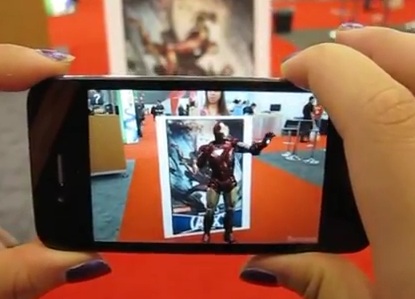
Aurasma is an augmented reality application.  The user scans an area with the camera on his/her phone and an animated sequence appears to come alive with what the app calls "auras."  For instance, the user can scan a movie poster that has been tagged with an "aura"and see the actor jump off the poster and interact with the user.  Furthermore, users can create their own "auras." While this seems mostly like a way for advertisers to utilize more dynamic advertisments, I could see this being an extremely valuable tool for educators.  A teacher can create auras relevant to his/her lesson and tag them onto a plant for science class, or a piece of art for art class.  By using Aurasma, the educator can adapt content onto reality itself.


Share Ideas & Opinions
Comic Life
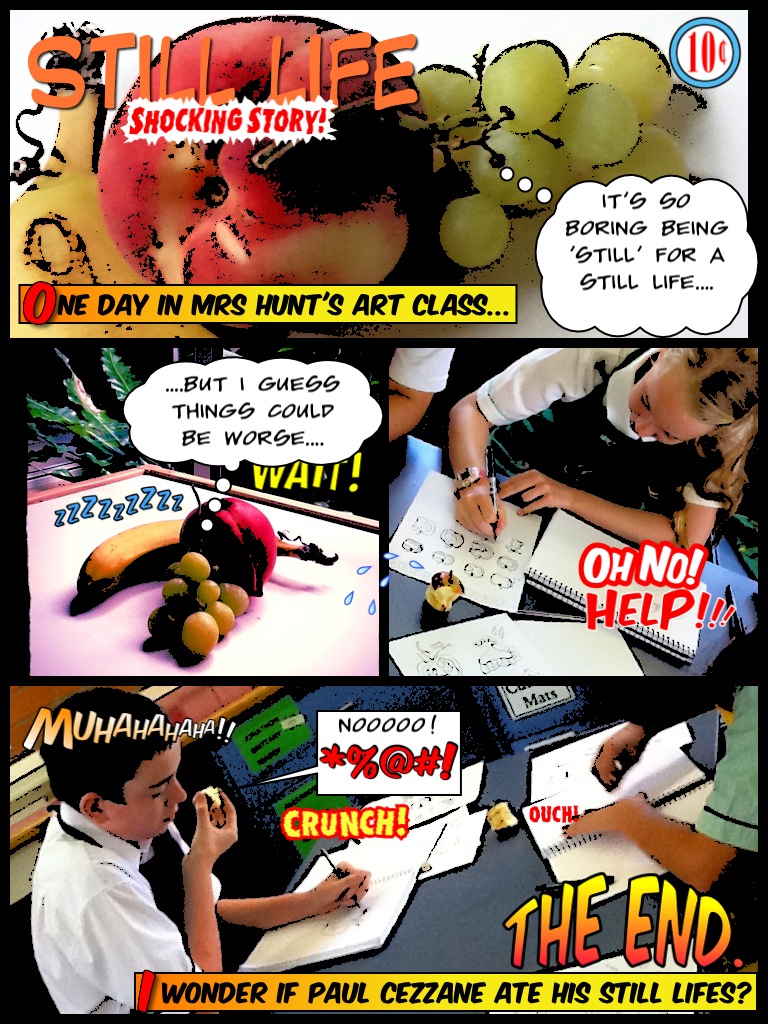
Comic Life applies a comic-book style template on to user's photos.  This allows students to create narratives from the photos on their phone.  It might seem a little out of the box, but I think this app would be very useful in making less exciting lessons a lot more dynamic and interesting for students.  They could make a comic of that day's class and share it with their peers.  


Working Together
Tapose

Tapose is an application for creating journals with a huge array of content that users can create themselves, find on the internet, or create with a variety of in app tools.  Users can collaborate with one another by sharing their journals.  This would be an extremely useful app for group projects.

Friday, September 26, 2014

Reflection on Emerging Technologies

                The prospect of integrating the technologies discussed in the New Media Consortium's Horizon report into a classroom environment is both exciting and intimidating.  It is an interesting time to be a teacher (or a prospective teacher, as it were) as we are on the cusp of an entirely new generation of learning.  Technology has effected most of our lives in some capacity, and it is vital that we integrate these new methods of learning into the classroom to  relate to our students and capture their attention.  Conversely, it is natural to be intimidated by the future as it could very well become a struggle to maintain relevancy in a landscape that is always changing.  Nonetheless, I consider new technology  a useful, powerful tool in educating students.  Specifically, the wearable technology described in the NMC report would be a huge asset to art students and any individual studying the visual arts.

                What struck me as most fascinating from the report was the likelihood of incorporating Google Glass and similar devices into the curriculum.  When Google Glass first came on the scene, the function that I heard most about was facial recognition technology.  It would not be a stretch to carry this technology over to the visual arts, so that students can identify the date, style, and creator of a particular piece of work.  If my students and I are taking a field trip to the Metropolitan Museum of Art, Google Glass could inform the students of specific information and details about a piece that might not be obvious at first sight.  This could rejuvenate anyone's interest and appreciation in a particular painting at a museum such as the Met where a viewer can easily be overwhelmed by the sheer amount of artwork before them.

Saturday, September 20, 2014

Learning With Technology

            As far back as I can recall, technology has been a vital component to my education.  I distinctly remember being in computer class during elementary school.  We would play Oregon Trail on the computers.  Presumably, our instructor felt it would help develop our critical thinking skills and provide us with a subliminal history lesson in the guise of being the fun game.  In reality, my classmates and I would have a ball subjecting our Oregon Trail family to starvation and scurvy. While this might not have proven as educationally beneficial as was hoped, it did solidify in me a love of gaming that would continue on throughout my life and culminate in my pursuit of a degree in animation.
            During my pursuit of a BFA in Animation/illustration from MSU, a significant amount of time was spent in front of a computer learning the ins and outs of some very complex animation and 3D sculpture programs.  The most significant of these was Autodesk Maya.  Autodesk Maya is software that allows the user to create models, skeletons, apply physics systems and create animations.  It is also a useful tool for rendering static three dimensional images.
The Autodesk Maya 2011 interface.
            A typical 3D animation class would have our professor projecting a feed of his monitor onto a projector screen.  Typically, he would play a brief PowerPoint presentation related to the day's lesson.  Our lessons ranged from the basics like frame-by-frame animation and poly-by-poly modeling to more advanced techniques like creating particle collision events.  After debriefing our lesson, the professor would have the class open Autodesk Maya.  He would do the same, and instruct the class step-by-step on how to solve whatever the problem in question was.  The class would follow along with his actions as they were being projected.  Once we finished our lesson, he would give us a similar but more rudimentary problem to solve by ourselves.  My peers and I were encouraged to help each other and troubleshoot before requesting assistance from the professor.  This fostered a sense of community within the classroom that enhanced our quality of education and reinforced whatever information was being posed to us in the lesson.
            It is difficult to overstate the importance of technology in a class where the main goal was to become familiar with industry-current software like Autodesk Maya.  A peripheral objective of my animation classes was to instill the fundamentals of animation and particular functions that are consistent with any animation or 3d rendering program into our minds.  This way, no matter what program was put before us, we would be capable of executing at least the most basic tasks.
            Autodesk Maya is the industry standard when it comes to 3d animation.  It is highly innovative and features cutting edge rendering technologies.  The only limitations were the computers themselves.  For the bulk of my education at MSU, the computers were relatively outdated and not nearly as powerful as needed to utilize all of Autodesk Maya's features in a timely manner.  For instance, to render a scene with certain light schemes or textures, it could take upwards of an entire day.  A scene is one frame, a single image, not a movie or animated short.  One can imagine how frustrating this limitation was.  Thankfully, towards the tail end of my pursuit of a BFA, MSU upgraded the machines.  Maya ran like butter, and we were free to create as complex a scene as we desired. 
            Our professor, Wobbe Koning, shared a few lessons from class on his youtube page.  These videos are essentially what we would follow in class, except that, naturally, he was teaching us live and not from a youtube video.  Below you will find a short video on creating a path animation.


Sources:
http://area.autodesk.com/img/products/maya/nondestructive_live_retargeting.png
https://www.youtube.com/watch?v=GxMmSF29VzY

Sunday, September 7, 2014

Flipped Classroom

In keeping with my pursuit of a degree in art education, I selected the lesson "A brief history of religion in art."  The video very briefly summarized the utilitarian use of visual art for religious purposes.  Many centuries ago, art was used to communicate the ideals and stories of various religions to individuals who were illiterate.  This is in stark contrast to the relatively new practice of putting art into museums for viewing pleasure.

The questions attached to the video were very rudimentary fill-in-the-blank questions with the exception of the last prompt which was an open-ended question.

This lesson was a fantastic use of the TED Ed technology.  There had to be almost a hundred different pieces of art work in the video to support the ideas of the narrator.  You simply can't achieve that using a slide projector or teaching from an art history text.

The "flipped classroom" idea is a brilliant way to educate students on visual art.  The dynamic animations coupled with the ability to showcase images of many different artistic works with ease is highly appealing to me.  I always felt that an art classroom should never delve into text based lessons - save that for English and Science!  In my opinion, the flipped classroom seems like a fun, stimulating way to teach children while embracing the convenience and functionality of technology.

A major limitation would be that the student might have questions during the video that an educator would not be able to address directly.  A student could, of course, write the question down to ask in class but it would take a certain level of motivation to do such a thing.  Another limitation would be purely technological - less tech savvy students or those without stable access to the internet might find it difficult to fulfill the requirements of a flipped classroom.  That being said, these issues are likely rare nowadays.

Personally, I relish the idea of using a flipped classroom.  As an art teacher, a lot of my assignments would be tactile.  However, for those times in which I want to give an overview on a specific method of art making or perhaps the history of a style or artist, I would be very comfortable using a video-based lesson.